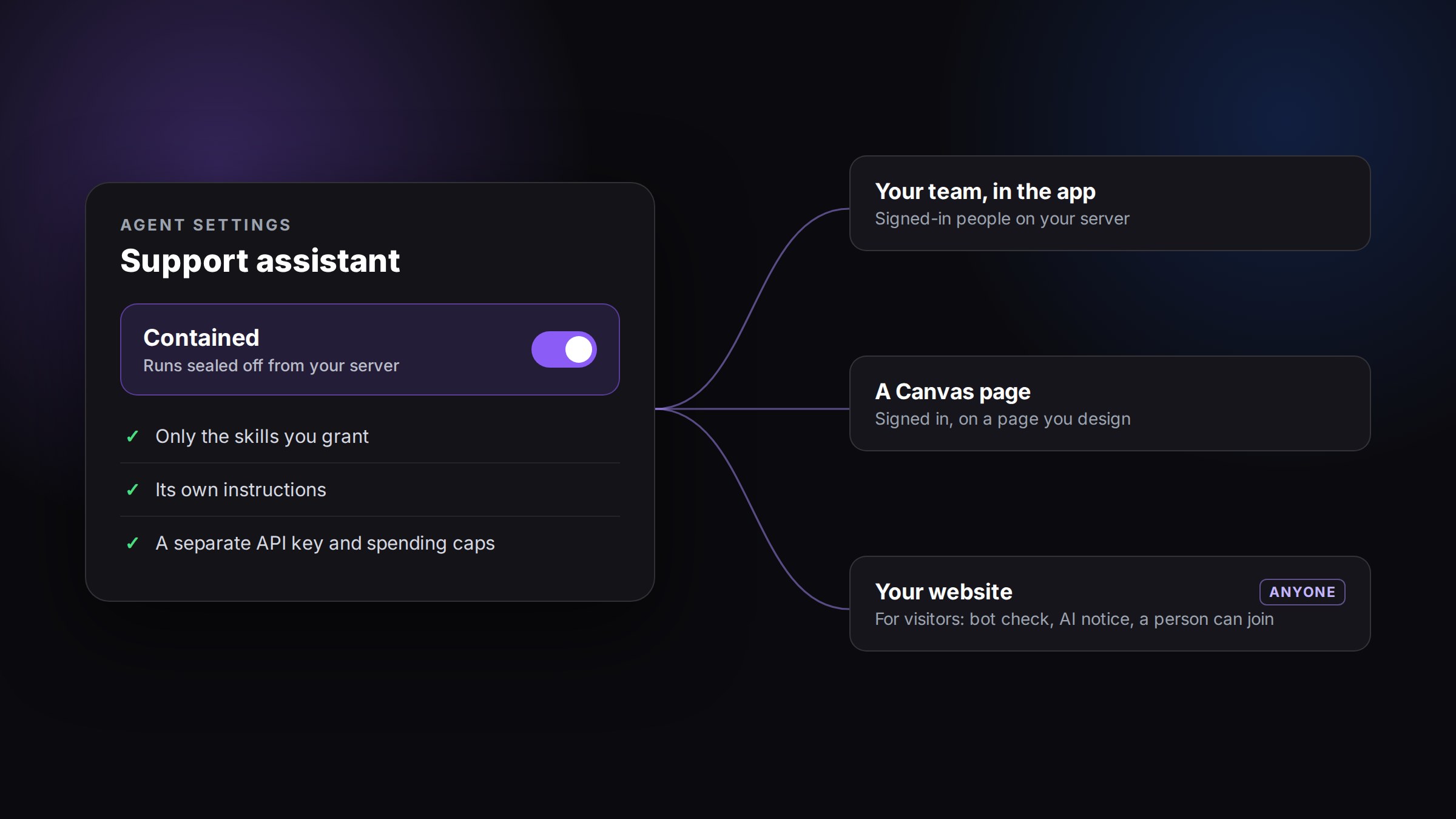
Agents you create can now be switched to Contained. Built-in and organization-managed agents keep full power; make a separate agent for contained use. A contained agent runs sealed off from the rest of your server, with only the skills you grant it, its own instructions and its own spending caps. That makes it safe to hand to your team, to a client, or to anyone visiting your website.
How it works
- Switch it on. In Canvas, an admin opens the settings of an agent you created and switches it to Contained.
- Give it only what it needs. Grant the skills and knowledge it may use, write its instructions, and set its spending caps. Only give it what you would be happy for its users to see. AI answers can be wrong; the agent is told not to invent facts, prices or promises.
- Choose where to use it. Use it in the app with your team, on a signed-in Canvas page, or let anyone talk to it on your website. For your website, turn on Anyone can talk to it, list the sites it may appear on, and add one script tag. Visitors do not need to sign in.
Built to be safe
- Sealed off from your server. Each conversation runs in its own sealed space. It cannot see your server's files, your other agents or sessions, your saved logins or your credentials. The only outside service it can reach is the AI model.
- A separate key and spending caps. Contained agents use a separate API key that is used only by contained agents, and your Claude subscription is never used. You set four spending limits, and each one is checked before any money is spent: per answer, per person or visitor per day (each website visitor and each signed-in team member counts separately), per agent per day, and per month for all contained agents on your server together. The defaults are $0.50 per answer, $2 per person or visitor per day, $20 per agent per day and $200 per month, and you can change each one. The same limits apply in the app, on Canvas pages and on websites. When a cap is reached, the person talking to it gets a polite message.
- A filter on everything it says. Every message on its way out passes a filter that removes passwords, keys and other secrets it recognises. It cannot catch a secret the agent has been talked into disguising, so only give the agent what you would publish.
- An off switch. Turn a contained agent off at any moment. New messages are refused straight away, and a reply in progress is stopped.
Only an admin can make an agent contained or let anyone talk to it, and every change is recorded. Nothing changes for your existing agents: they keep working exactly as before.
When anyone can talk to it
- It says it is an AI. The chat tells visitors up front that they are talking to an AI assistant. Replies from a person are marked as coming from a person.
- A person can join. When the agent needs help, it asks for a person, and the conversation shows as waiting for you in your settings. While a person handles the conversation, the agent stays quiet until you hand it back.
- Limits per visitor. A bot check runs when the chat opens, and each visitor has a limit on messages per minute and replies per day.
- Visitor privacy. Visitors do not sign in. Each gets an anonymous id and can only ever see their own conversation. You can read the conversations; they are deleted after the retention period you set (90 days unless you change it), and an admin can delete a visitor's conversation at any time. Visitor messages are processed by the AI model provider to write the answers. Our usage records note only what the agent did and spent.
What it does not do yet
To keep the first version tight, a contained agent cannot browse the web, use saved logins, remember things between conversations, run schedules, message other agents, or reply on Slack or by email. It runs on Claude models only. Each of these may come later, after its own security review.
Three ways to use it
Customer support on your website (more). Give the agent your product documents and help articles, set the caps, and let it answer common questions around the clock. When a question needs a person, the conversation shows as waiting for you, and you take it over.
Agents that do one job, for your clients (more). Build an agent that does one thing well, contain it, and offer it to a client, with the knowledge it should use and caps that match the client's budget.
Internal helpdesks (more). Give your team an agent that answers questions about your own policies or tools, with only the knowledge it needs and nothing else on your server within its reach.
How to start
- Read the contained agents guide. It walks through every step.
- In Canvas, as an admin, open the Contained settings of an agent you created and switch it on. The first time, press Set up on this server: it needs about 6 GB of free disk space and uses about 4 GB.
- Add the separate API key used only by contained agents. Grant its skills and knowledge, write its instructions, and set its caps.
- Try it yourself in the app.
- To put it on your website, turn on Anyone can talk to it, list the sites it may appear on, and add the script tag.
There is more about what contained agents can do on the feature page.
Availability
| Fact | Value |
|---|---|
| Availability | Every CRHQ server. An admin switches it on in an agent's Contained settings in Canvas, and the first time presses Set up on this server |
| Where | Canvas: an agent's settings, admins only |
| Live since | 2026-10-27 |
| Cost | A separate API key used only by contained agents, within the caps you set |
| Client action required | To start, press Set up on this server once (about 6 GB free disk needed, about 4 GB used) and add the API key used only by contained agents |