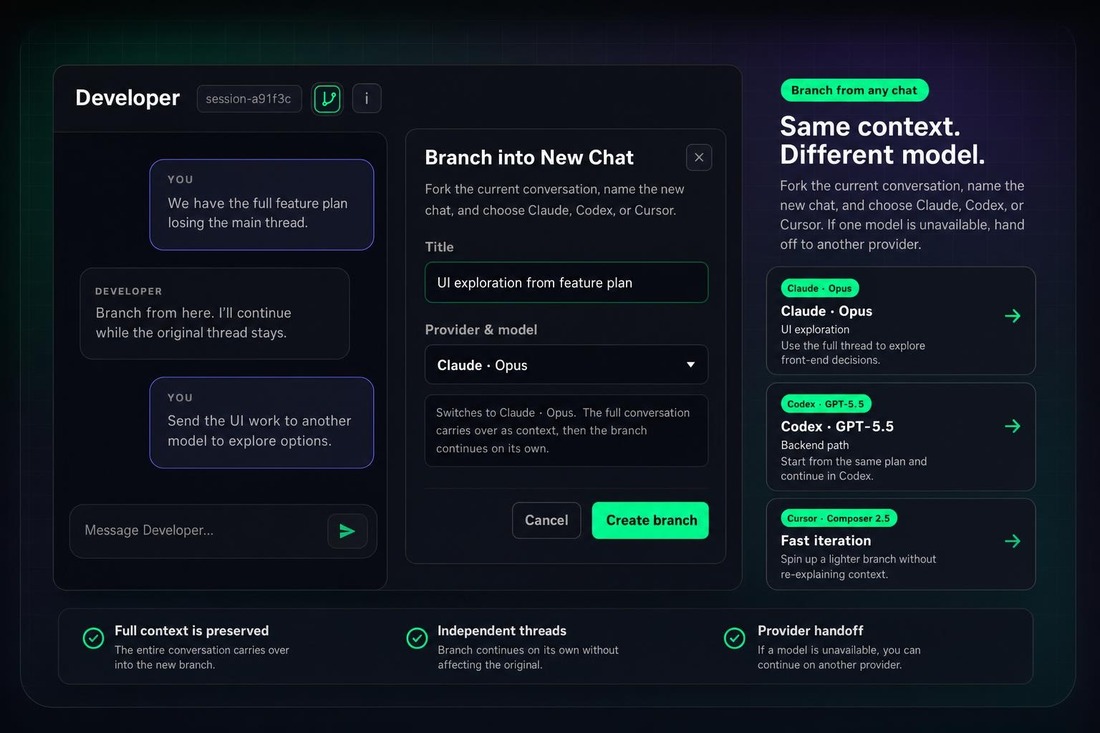
CRHQ now lets you branch any active session into a new chat. The new chat keeps the full conversation so far, while the original stays exactly where it was.
What is new
Branch into a new chat. Click the branch icon in the session header to create a new session from the current conversation.
Name the branch. Give the new chat a clear title before it opens.
Pick the model or provider. Continue the same context on Claude, Codex, or Cursor.
Keep the original untouched. The original chat and the branch diverge independently after the branch is created.
Why it is useful
Explore a tangent without cluttering the main thread. Branch before you try a different direction.
Run parallel work from one starting point. For example, send one branch to Opus for UI exploration and another to GPT-5.5 through Codex for backend work.
Switch models without copy-paste. Move the full conversation to another model or provider without re-explaining the context.
Hand off when a model is unavailable. If one provider is busy or temporarily unavailable, branch to another provider and keep moving with the same context.
Create reusable starting points. Load a session with the background, files, and direction you need, then branch from it whenever you want a fresh run from the same setup.
How to use it
- Open any session.
- Click the branch icon next to the session ID in the header.
- Name the branch.
- Choose the provider and model.
- Click Create branch.
The new session opens with the prior conversation behind it, ready for the next instruction.
Notes
Staying on the same provider keeps the branch in native session context. Switching providers carries the conversation over as context for the new provider, then the branch continues independently.